Tips to optimize your website performance
The content you're reading is getting on in years
This post is on the older side and its content may be out of date.
Be sure to visit our blogs homepage for our latest news, updates and information.
- Ensure that compilation debug property is set to false on your production - Don’t run production ASP.NET Applications with debug=”true” enabled .
- Enable PageCaching - the default CachingProvider that is used for pages in ASPNET.
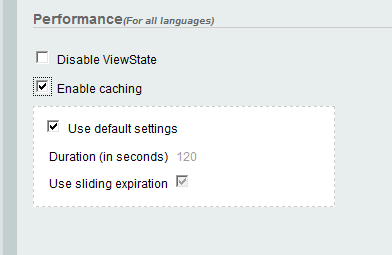
Generally the pages output depends on what you have on your pages - how many controls you have on a page, how many images images, scripts etc you are loading, how do you bind the controls to your data source etc.
- Use ScriptResourceHandler that processes all requests for embedded script files that are referenced through the ScriptManager class. By default, the ScriptResourceHandler class compresses and caches embedded script files for Internet Explorer 7. You can turn compression and caching off through the EnableCompression and EnableCaching properties. When an ASP.NET page that contains AJAX functionality runs on IIS 7.0 on Windows Vista , and if the managed pipeline mode of IIS 7.0 is set to Integrated, the scripts processed by the ScriptResourceHandler class are not cached. The scripts are cached when the managed pipeline mode is set to Classic. For more information about the managed pipeline mode of IIS 7.0, see Upgrading ASP.NET Applications to IIS 7.0: Differences between IIS 7.0 Integrated Mode and Classic Mode.
- Use HTTP compression to decrease the page size before sending the page. The idea of compression is that client receives the compressed content, then decompresses it on the fly before rendering the page. You could try to enable IIS compression - IIS 7: HTTP Compression API Reference
- You could also try to use RadCompression and ViewState compression.
- Another options - HTTP Gzip and Deflate compression ( deflate is better).
- Using RadStyleSheetManager - when added to a page the stylesheet requests will be combined into a single request. By default each of the RadControls for ASP.NET Ajax serves a set of files (stylesheets) needed for its proper client-side look. When loading a page with several controls on it, the number of these files can become very large, often resulting in a reduced page load time and increased traffic. So RadStyleSheetManager reduces the bandwidth. You could try using RadScriptManager as well. RadControls for ASP.NET AJAX supports CDN which will also decrease your bandwidth.
- Increase the IIS Recycling
Configuring Recycling Settings for an Application Pool (IIS 7)
Using page caching should be used together with Substitution controls to specify a section of an output-cached Web page where you want to display
dynamic content
- Performance Optimizations - Why Output Cache is Important
- Performance Optimizations Part 2 – Cache Substitution
Controls
Related articles

The Progress Team
View all posts from The Progress Team on the Progress blog. Connect with us about all things application development and deployment, data integration and digital business.
Comments
Topics
- Application Development
- Mobility
- Digital Experience
- Company and Community
- Data Platform
- Secure File Transfer
- Infrastructure Management
Sitefinity Training and Certification Now Available.
Let our experts teach you how to use Sitefinity's best-in-class features to deliver compelling digital experiences.
Learn MoreMore From Progress



Latest Stories
in Your Inbox
Subscribe to get all the news, info and tutorials you need to build better business apps and sites