Themes & Templates

Mobile Starter Theme

by Data Universal Inc.
Updated on: November 9, 2009 | 27780 views

Compatibility: Version 3.7 , Version 3.6
Tags: Light , Mobile , Free
Terms Of Use
Download from Publisher
FREE

Mobile Starter Theme is a lightweight theme designed for mobile browsers.

Demonstrated below:

  • BlackBerry Browser, MobileBasic template
  • Mobile Safari (iPhone, Android smartphones), MobileBasic template
  • Not supported mobile browser, e.g. UP.Browser, page based on MobileStart template

To see the Mobile Starter Theme in action please point your mobile browser to http://demo.datauniversalinc.com

Screenshots

14 comments

  • Adam 13 Dec 2009
    06:59 AM
    I apologize if this is a naive question.  I went to the demo site and it looks good.  Our clients have Sitefinity sites that we would like to have a mobile version.  How does this template work with the existing site (if at all)?  As much information as possible.  I am happy to hear about all the benefits.
  • Leonard Tarteata 16 Dec 2009
    01:17 AM
    Adam - we've made available a "Quick Start Guide" on the theme download page. It provides step-by-step instructions on how to build your Sitefinity mobile website side-by-side with your existent, desktop browser-oriented site: Mobile Starter Theme Info

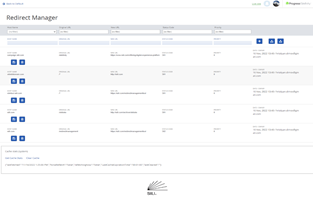
    Mobile browsers can be automatically redirected to the mobile microsite using our "Response Redirect Control", also available as a free download.

    Being a starter theme, it includes mobile-friendly templates for the News public controls only (List View, Single Item View) - please see part 2 of the guide.


  • Sanish Joseph 08 Feb 2010
    11:08 PM
    I have created a module for my client in Sitefinity. Everything was very smooth. Client is so impressed with Sitefinity, so do I. Now he wants the same module in mobile. A mobile version of Sitefinity. I tried to configure mobile version with the example you have given, but how can I test it.
    Is it required to install any Simulators. I already have Blackberry and Windows Mobile simulators installed. I don't know how to configure it so I can see the local Sitefinity. Please explain how can I test the Mobile Sitefinity.
    Thanks in advance.
  • Leonard Tarteata 09 Feb 2010
    05:11 AM
    @Sanish - in order to use a BlackBerry simulator for any website, including those running on your box, you'll need to download and install the Email and MDS Services Simulator Package v4.1.4 as well (download link at the bottom of the page).

    To browse any website on a BlackBerry simulator:

    1. start the MDS simulator;
    2. start a device simulator;
    3. open the BlackBerry browser and type-in your website address - for local websites use your computer name rather than "localhost".

  • Sanish Joseph 09 Feb 2010
    11:47 PM
    Thank you very much for the reply. I got another doubt regarding the redirection of pages.
    As per the example its telling me to simply use App_Web_responseredirect.ascx.4651b6ae.dll , 
    Its not telling me how to use it. How can I use the Dll to redirect pages? Also whats the use of ResponseRedirect.ascx page? 
    Where can I use the properties inside DLL in any .aspx files or .cs file?
  • Sanish Joseph 10 Feb 2010
    12:10 AM
    I downloaded the Email and MDS Services Simulator Package v4.1.4 but when I try to install 
    "This archive is corrupted" is popping up.
  • Leonard Tarteata 10 Feb 2010
    07:10 AM
    @Sanish - to make use of the "Response Redirect" user control follow these steps:

    1. Install the control as described on the control download page - [Installation] tab; upon successful installation the control will be available for use on any page or template from the "Add controls" sidebar;
    2. Add the control to the "regular" page you want to redirect from when accessed by mobile browsers. If the redirect has the same target URL for all "regular" pages - then add the control to the page template(s);
    3. After adding the control click the "Edit" link and provide values for all properties as applicable to your use case (read the description for all available control properties from the same control download page - [Properties] tab).

    Regarding the MDS download - most likely got corrupted during the download. You can try to download it again from RIM's website, or from my dropbox: BlackBerry_MDS_4.1.4


  • Asics Onitsuka Tiger 16 Sep 2010
    02:12 AM

    The Asics Onitsuka Tiger comes from the popular Asics sub brand, Onitsuka Tiger. Many people often get confused, but it is an Asics shoe in every sense of the word. Because it has been around so long, there have been many different imitations, but none have held up to the original. This shoe has seen its way into popular culture and it is considered to be in the top Asics Mexico 10 of casual sneakers. If you do not own a pair, you are surely missing out on something really awesome.To wrap things up, the Asics Onitsuka Tiger Mexico 66 is a really cool shoe. It is not only comfortable, but it has an indelible style that cannot be  replicated anywhere else. Its colors, design and flair are the reason why it is so popular almost 40 years after its first release. There are so many Asics Gel Kinsei 2 different colors to choose from and they can match the preference or fashion of the person wearing it. This is a must have shoe and if you have never owned a pair of Mexico 66's, now is the perfect time to do it.Over the years this shoe has evolved into Asics Mexico 66 something that goes along well with casual wear. You have people who wear them with jeans, shorts, dresses and even suits. The cool style and look of the shoe allows it to be mixed and matched with about anything. That is why so many people love the shoe, because it is so versatile.The Asics Onitsuka Tiger Mexico 66 is a rather simple shoe. It is Onitsuka Tiger Mexico 66 generally made from leather, has a suede tip and the famous stripes at the side make it stand out from the others. Over the years other styled shoes have evolved from the Mexico 66 and these would be the Mexico Tigress and the Mexico 66 Baja's. The Tigress is geared towards females as it has a cute and unique style. The Baja's do away with the laces and opt for the more funky Velcro. The shoes can be had in a wide variety of colors, with white, black and blue being the most popular.

  • Lipo 22 Sep 2010
    02:31 PM
    This was a very interesting story and hopefully I can learn more from your information. Its sad that there are people out there that want to hurt us. This is really sad to me.
    <a href="http://www.lexus.co.uk/range/ct/ct-200h.aspx" title="CT 200h">CT 200h</a>
  • BP 01 Oct 2010
    03:53 PM
    What if I only want this to work on the iPhone and not the iPad?
  • Leonard Tarteata 04 Oct 2010
    12:41 AM
    The redirect to the mobile page(s) that use the Mobile Starter Theme can be easily controlled through our Response Redirect Control, by providing a configuration value for a list of keywords to look for in the browser user-agent. If a keyword is found, the redirect happens.

    In your case, if "IPad" is not specified as a keyword, and "IPhone" is - then the redirect will only be performed for the IPhone.

    Please note that in this case "mobile" should be avoided from the list of keywords as it is present in many mobile browser user-agents, including both the IPhone and the IPad.
  • Brian 20 Sep 2011
    04:09 PM
    So I set everything up but I'm running into an interesting issue. When the redirect is present is redirects every browser, not just mobile browsers.
  • Brian 20 Sep 2011
    04:11 PM
    I figured it out. It is because I did not set RedirectTheseRequests to keywords
  • jesika 04 Feb 2012
    03:57 AM
    These are really wonderful phones with amazing features. Admiring the time and effort you put into your blog and detailed information you offer!  Desert Mountain AZsearchforhomes
    I will bookmark your blog and have my friends also check up here often. Thumbs up!

Add Comment

  • Providing an email will subscribe you for receving comment notifications.

  •